







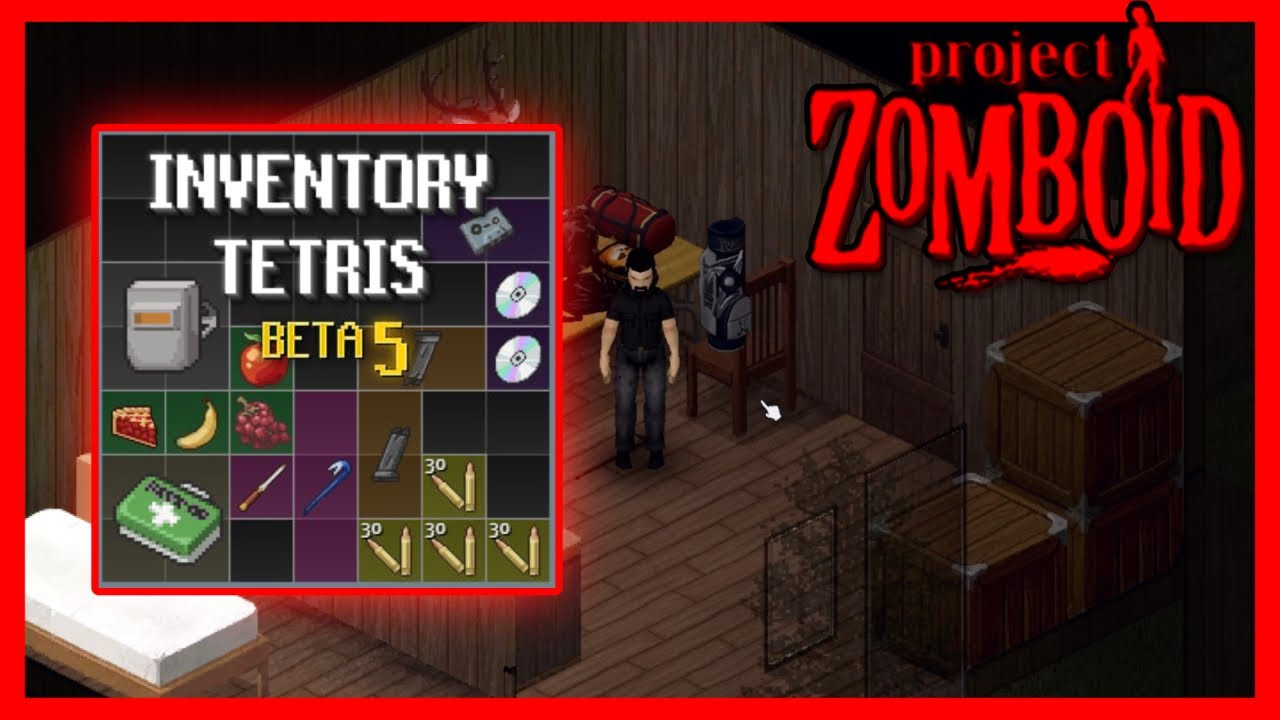
In the world of survival games, efficient inventory management is one of the most important aspects of gameplay. Project Zomboid, a popular zombie survival game, has always focused on realism, and managing your gear is no exception. That’s where the Tetris Inventory Mod comes in. This mod revolutionizes how players organize and carry their items in the game, offering a more immersive, grid-based system that mimics the mechanics of Tetris. If you’ve ever found yourself struggling with item management in Project Zomboid, this mod is a game-changer.
In this article, we’ll dive deep into the Tetris Inventory Mod, exploring its features, benefits, how it works, and why it matters for players. We’ll also cover some practical tips for using the mod effectively and how to install it. Let’s get started!
What is the Tetris Inventory Mod in Project Zomboid?
The Tetris Inventory Mod is a popular mod for Project Zomboid that changes the way the game’s inventory system functions. Unlike the default list-based inventory where items are simply listed by name, the Tetris Inventory Mod organizes items in a grid system. Each item is represented by a block that takes up a specific amount of space, similar to how Tetris blocks fit into a grid. The mod adds more realism and strategy to the game by forcing players to think critically about how they organize their items.
This grid-based system offers players the ability to manage inventory in a much more visually structured and strategic way. Whether you’re looting supplies, preparing for a fight, or organizing your stash of food and weapons, the mod makes it easier to see everything in a more organized manner. Items take up physical space, which means you have to be smart about how you fit everything into your bags, backpacks, and other containers.
Why the Tetris Inventory System Matters for Players
Project Zomboid is a game all about survival, and inventory management plays a huge role in staying alive. The Tetris Inventory Mod offers several key benefits that make it an essential tool for players:
-
Realistic Management: Unlike the default system where items are simply stacked into a list, the Tetris Inventory Mod reflects real-life limitations in space. Players need to carefully consider how to fit all their supplies into their inventory, much like how they would pack a bag in real life. This adds a level of realism and immersion that the standard system lacks.
-
Improved Strategy: The mod forces players to think strategically. For example, if you need to carry more weapons, you may have to leave behind some food or medicine. With the grid system, you have to balance what you carry and plan for different situations, such as combat or scavenging.
-
Organization: The visual organization provided by the mod helps reduce clutter in your inventory, making it easier to find and access the items you need in tense situations. Whether you’re under pressure during a zombie attack or just scavenging through a building, having a well-organized inventory can make a significant difference in your survival chances.
How Tetris Inventory Transforms the Standard UI
The Tetris Inventory Mod transforms the default user interface (UI) by adding a grid layout. Instead of the list-based system where items are sorted by name and weight, the mod places them into a physical grid. This is similar to how a Tetris game works, where each piece or item has a specific shape and size, and players must arrange them efficiently to maximize available space.
The transformation from a list-based inventory to a grid-based one enhances the user experience by providing a more intuitive, visual system. The UI is much more interactive, and players can see how their items fit together in real-time. This not only makes the game more immersive but also adds an element of puzzle-solving as you figure out the best way to pack your inventory.
Additionally, containers and bags are reworked to provide actual grid space rather than just changing weight limits. This means you need to plan your storage and carrying capacity carefully, rather than simply relying on the weight system to decide how much you can carry.
Key Features of the Tetris Inventory Mod
The Tetris Inventory Mod comes with several features that significantly enhance the gameplay experience. Some of the key features include:
-
Grid-Based Organization: Items are placed in a grid, and each item takes up a certain amount of space based on its size and shape.
-
Container Space Management: The mod adds grid spaces to bags, backpacks, and other containers. This change makes it more challenging and rewarding to manage your gear.
-
Visual Feedback: Players can easily see what items fit in their inventory and which ones don’t. The grid system gives instant visual feedback on the organization of your items.
-
Inventory Sorting: The mod allows for easier sorting and categorization of items. You can quickly identify where things are stored, whether they’re food, weapons, or medical supplies.
-
Compatibility with Other Mods: The Tetris Inventory Mod is compatible with many other popular mods, which means it integrates seamlessly into your existing Project Zomboid experience.
Key Benefits of Using the Tetris Inventory Mod
The Tetris Inventory Mod offers several benefits that improve your overall gameplay experience in Project Zomboid. Here are some of the most notable advantages:
Realistic Item Management
One of the most significant benefits of the Tetris Inventory Mod is the realism it adds to the game. In the real world, when we pack a bag or a backpack, we must consider how to fit all the items efficiently. The Tetris mod replicates this by forcing players to fit items into grid spaces, reflecting how real-world items take up space.
In a survival scenario like Project Zomboid, managing your resources effectively is key. The mod makes it clear that space is just as important as weight, forcing you to think carefully about what you carry and how to arrange it.
Enhanced Immersion and Strategy
The Tetris Inventory Mod makes the game feel more immersive by simulating real-world limitations. It requires players to make strategic decisions about their gear and supplies. Do you take more food, or do you prioritize weapons? Will you be able to carry enough medical supplies for a long stretch of exploration? These are the types of decisions the mod forces you to make.
With this system, there’s no longer the comfort of an “infinite backpack” that holds all your supplies. You must make real choices that affect your chances of survival.
Better Space Utilization and Organization
The grid system encourages better organization and space management. You’ll no longer have to scroll endlessly through a list of items to find what you need. Instead, everything is visually laid out for you, and you can see exactly what’s in your bag and how much space remains. This makes it easier to plan ahead and avoid wasting precious space during crucial moments, like during a zombie attack or when scavenging for food.
How the Tetris Inventory System Works
The Tetris Inventory Mod works by introducing a grid system for your items. Each item in your inventory occupies a certain number of grid slots, based on its size and shape. The grid system adds a layer of complexity to the game’s item management mechanics, requiring players to organize their supplies strategically.
-
Item Sizes and Shapes: Each item has a specific size and shape. For example, a large weapon or bulky armor piece may take up more grid space, while smaller items like medicine or food can fit into compact slots.
-
Containers and Bags: Containers such as bags or backpacks are also represented as grids. Each type of container has its own capacity, and some containers may have larger grids than others.
-
Looting and Scavenging: When looting, players need to consider both the weight and the space of the items they collect. Items that don’t fit into available grid spaces must be left behind.
Tips for Using the Tetris Inventory Effectively
Mastering the Tetris Inventory Mod takes practice, but with a few tips, you can quickly optimize your inventory management:
-
Plan Your Loadout: Before heading out, plan your inventory space. Make sure to carry essential supplies like food, water, and weapons, but leave enough room for emergency items you may find along the way.
-
Use Smaller Items for Quick Access: Keep small, frequently-used items like first-aid kits, bandages, or snacks in easy-to-reach slots.
-
Organize by Categories: Group similar items together. For example, keep all medical supplies in one section of your inventory and tools in another. This way, you’ll know exactly where to look when you need something in a hurry.
-
Prioritize Space Over Weight: While weight is important, space utilization is even more critical. Focus on fitting items into your inventory instead of just picking up anything that doesn’t weigh too much.
Common Challenges and How to Overcome Them
Like any system, the Tetris Inventory Mod presents a few challenges that players need to adapt to. Here are some common issues and how to tackle them:
-
Item Overlap: Sometimes, larger items may overlap with smaller ones, making it hard to fit everything. To solve this, prioritize items based on their importance and re-organize when needed.
-
Limited Grid Space: If you’re constantly running out of space, consider using a larger container like a duffel bag or backpack. Also, try to leave behind unnecessary items when you find something more valuable.
-
Inventory Clutter: Keeping your inventory organized is essential. Regularly sorting and discarding useless items will prevent your grid from becoming cluttered.
How to Install the Tetris Inventory Mod
Installing the Tetris Inventory Mod is straightforward. Here’s how to do it:
-
Download the Mod: Go to the Steam Workshop or your preferred modding site and download the Tetris Inventory Mod.
-
Install the Mod: Follow the installation instructions provided with the mod. Usually, it’s as simple as dragging and dropping the mod file into the game’s mods folder.
-
Activate the Mod: Once installed, go into your Project Zomboid settings and activate the mod in the mod manager.
Upcoming Features and Updates
The developers behind the Tetris Inventory Mod are always working to improve it. Some of the upcoming features include:
-
Expanded grid spaces for larger bags and backpacks.
-
Customizable grid sizes based on player preferences.
-
Improved compatibility with other mods and game updates.
Conclusion: Is the Tetris Inventory Mod Worth It?
The Tetris Inventory Mod is a fantastic addition to Project Zomboid that adds both realism and strategy to inventory management. By forcing players to organize their supplies and make smarter decisions about what to carry, the mod enhances the overall survival experience. While it may take some time to get used to, once you master it, you’ll find yourself better prepared for the challenges that Project Zomboid throws your way.
If you enjoy a more immersive, strategic survival experience, the Tetris Inventory Mod is definitely worth installing. It transforms the mundane task of inventory management into a critical part of your survival strategy, making it an essential tool for anyone looking to improve their gameplay.
Also Read:


